
Skip to content

WORK / 03

PRODUCT · IN DEVELOPMENT

Boxing Technique Journal

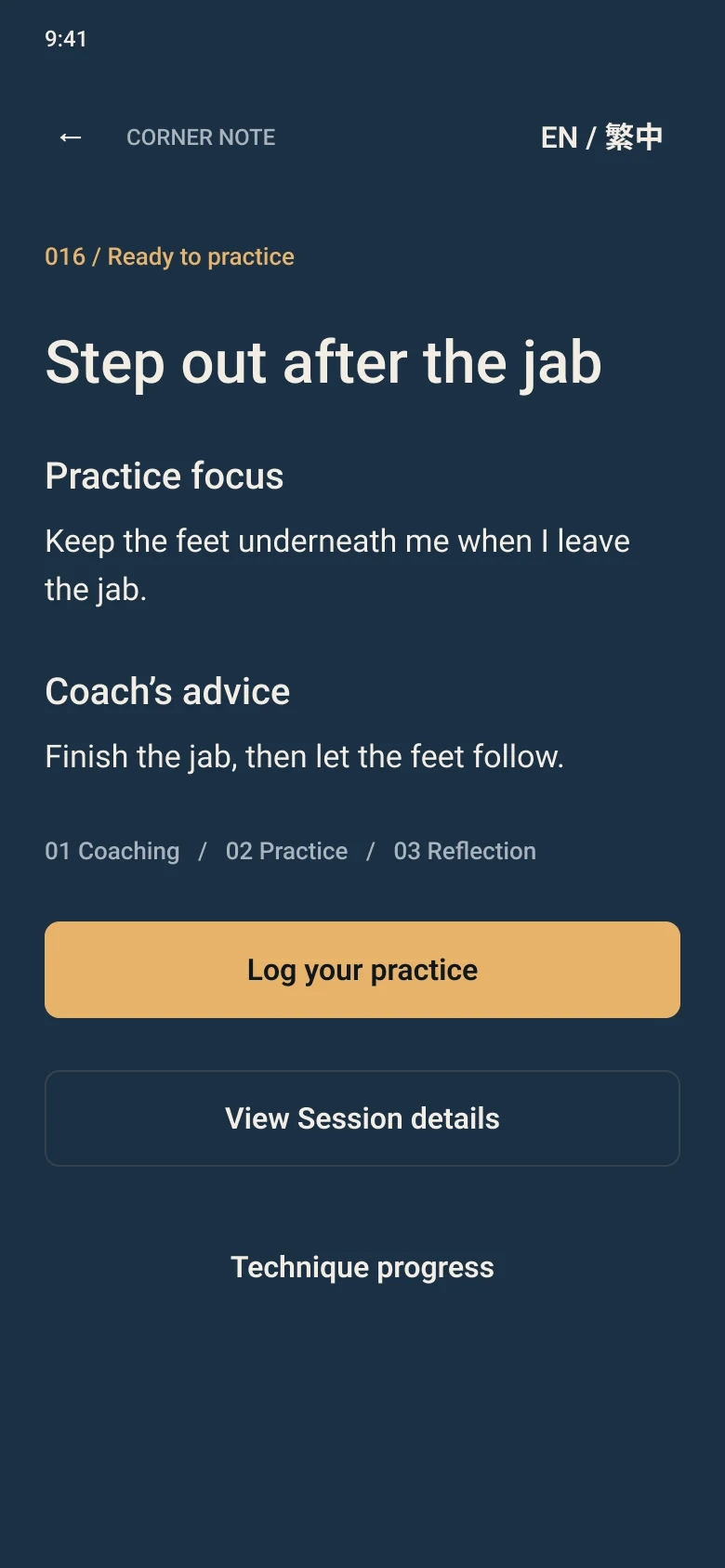
A short, structured journal for boxing classes and solo practice. Each session is recorded in the same frame, so lessons can be recalled, linked and built on.

ROLE
Product owner · In development
STATUS
Internal iOS builds · not yet public
PLATFORM
iPhone · English / 繁體中文
BUILT WITH
AI-assisted development, human acceptance
Interface design: the Corner Note home screen with a session in progress.
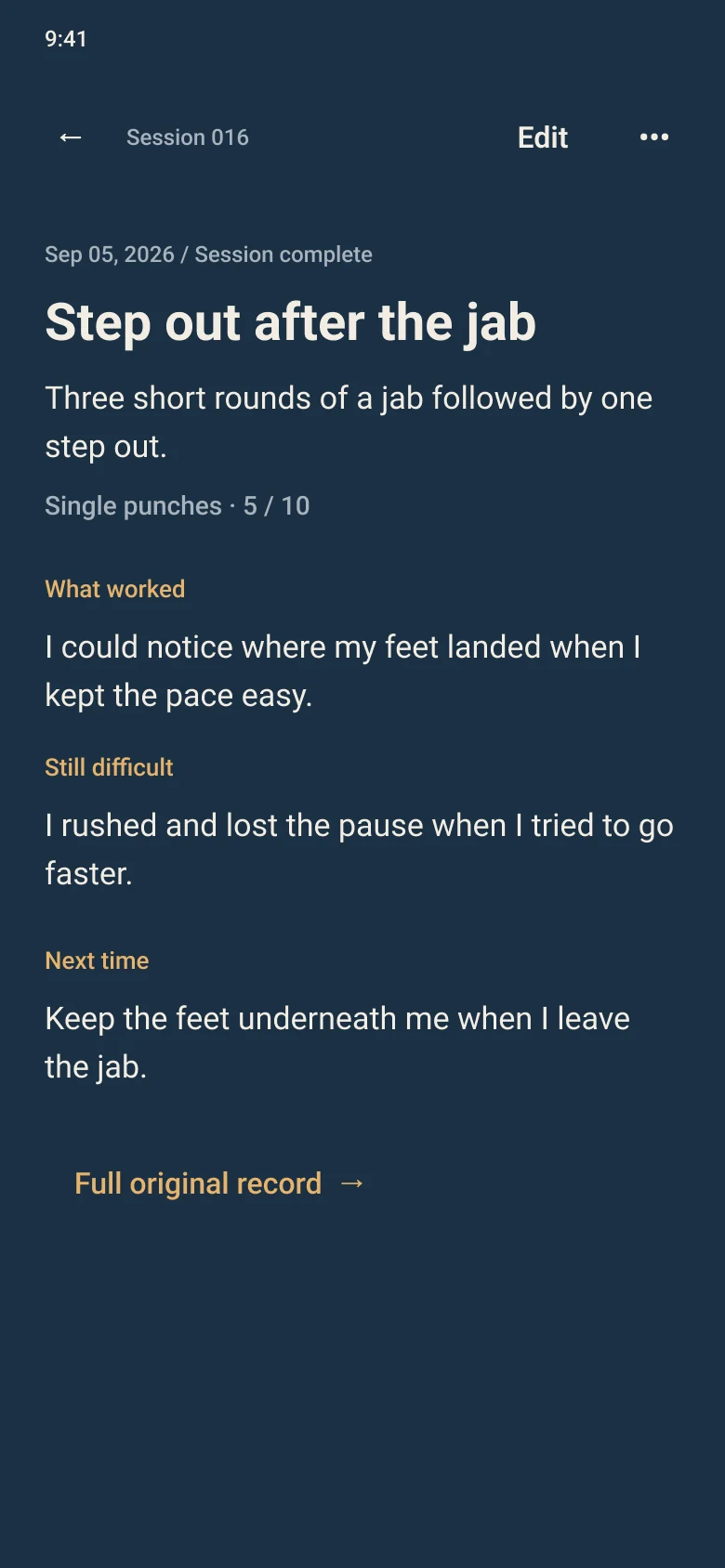
Interface design: a completed session record.
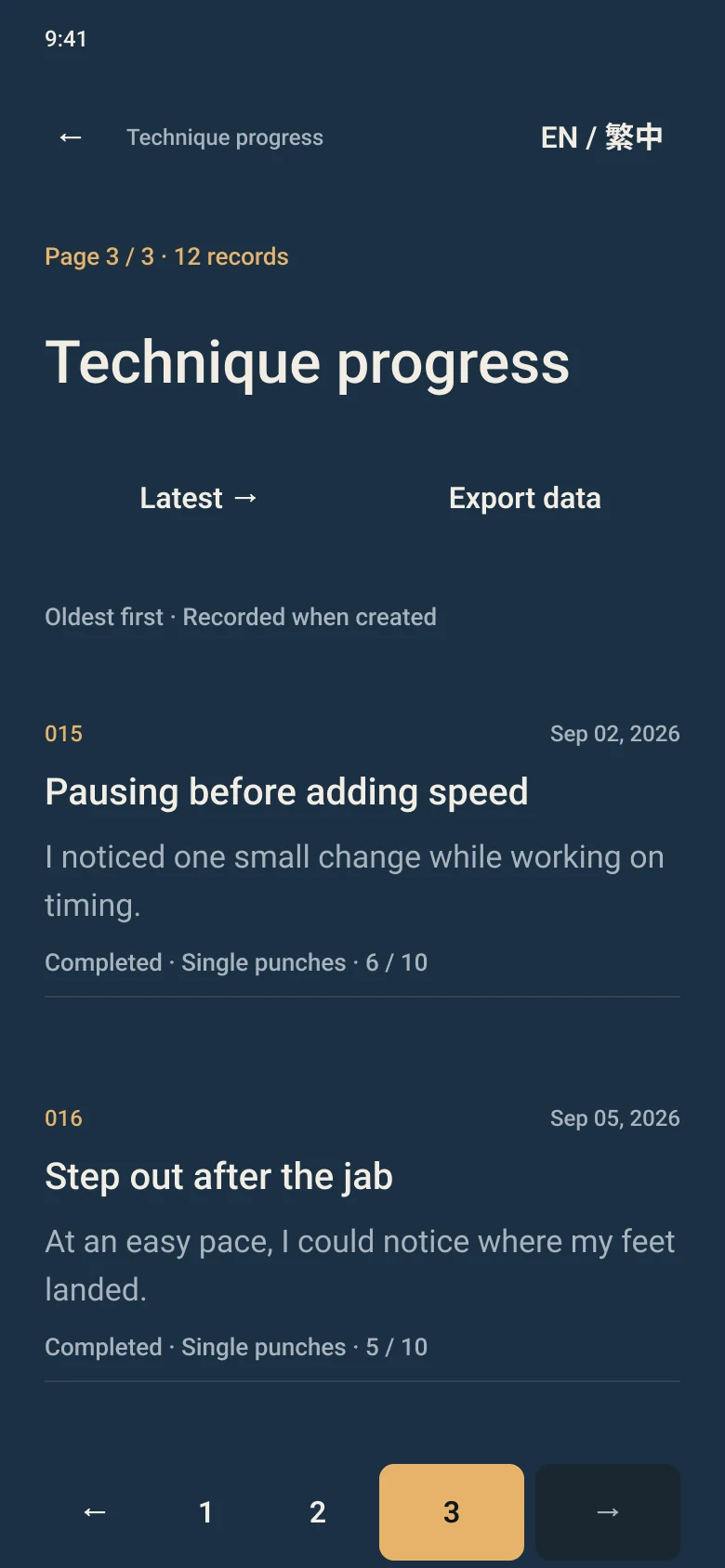
Interface design: Technique progress, listing sessions oldest-first.

INTERFACE DESIGN

01 · OVERVIEW

One lesson, kept in the same frame every time.

Boxing classes move fast. A coach’s correction is clearest right after class and fuzzy by the next one. BTJ is an iPhone journal that keeps the coach’s words, turns them into one thing to practice alone, and records what changed. I’m also its first user: every record so far comes from my own classes. I own the product — requirements, decisions and hands-on acceptance — while AI does most of the implementation inside a workflow I set up.

MY ROLE
Product owner
MY PART
Requirements, product decisions, the AI workflow, acceptance
AI’S PART
Analysis, implementation options, code, tests, copy revisions
NAMES
BTJ is the project. Corner Note is the brand on screen.

02 · PROBLEM

Coaching fades between classes.

  1. 01

    The words fade

    A correction is precise in the moment and vague a week later. Paraphrasing it changes what the coach meant.

  2. 02

    Practice drifts

    Alone, it’s easy to practice something next to what the coach actually said.

  3. 03

    Progress hides

    Without the same frame every time, one session can’t be compared with the next.

THE DESIGN QUESTION

How do you keep a coach’s words intact, turn them into one focus, and still let the record be corrected — without rewriting what happened?

03 · THE SESSION

Three steps. One record.

Every session follows the same path, and the app only saves at points that mean something.

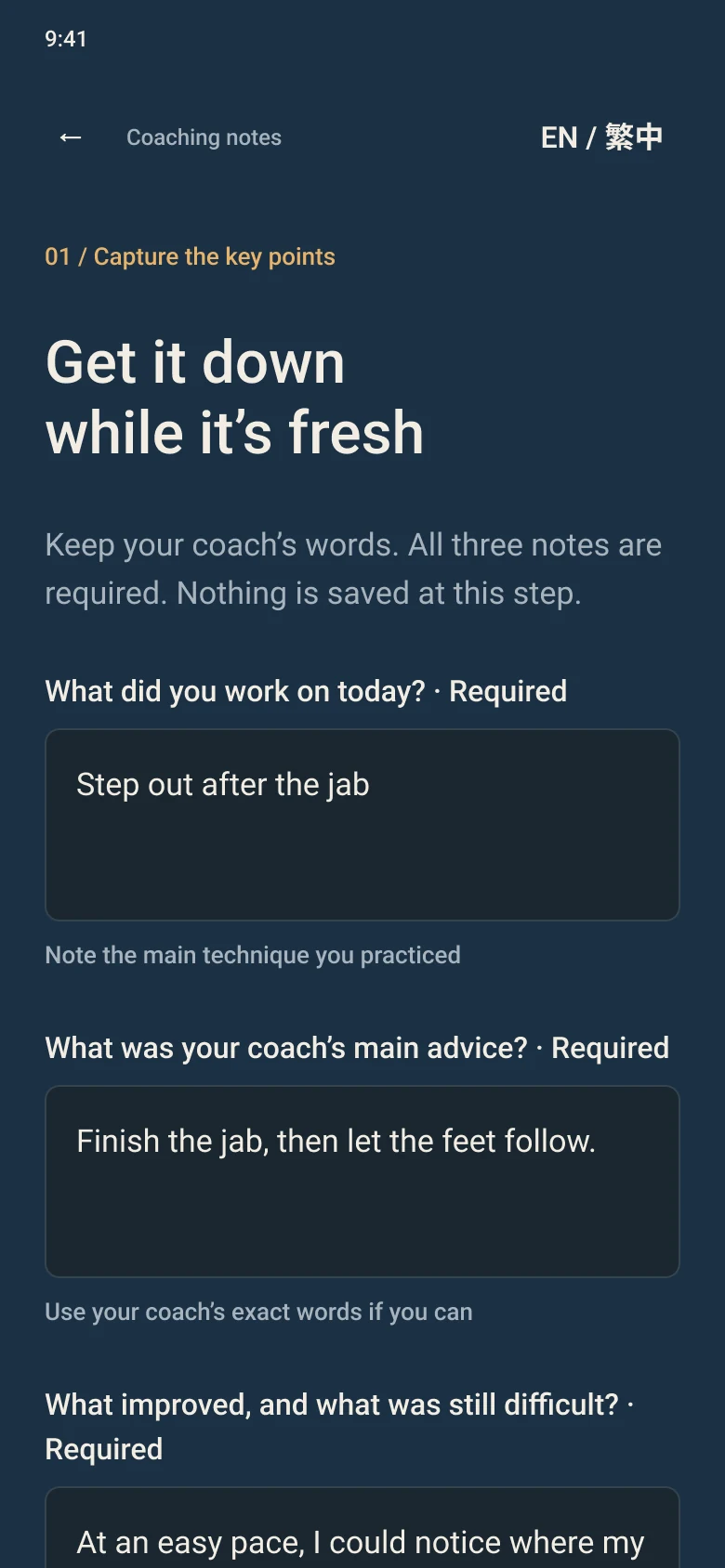
STEP 1 · COACHING

Get it down while it’s fresh

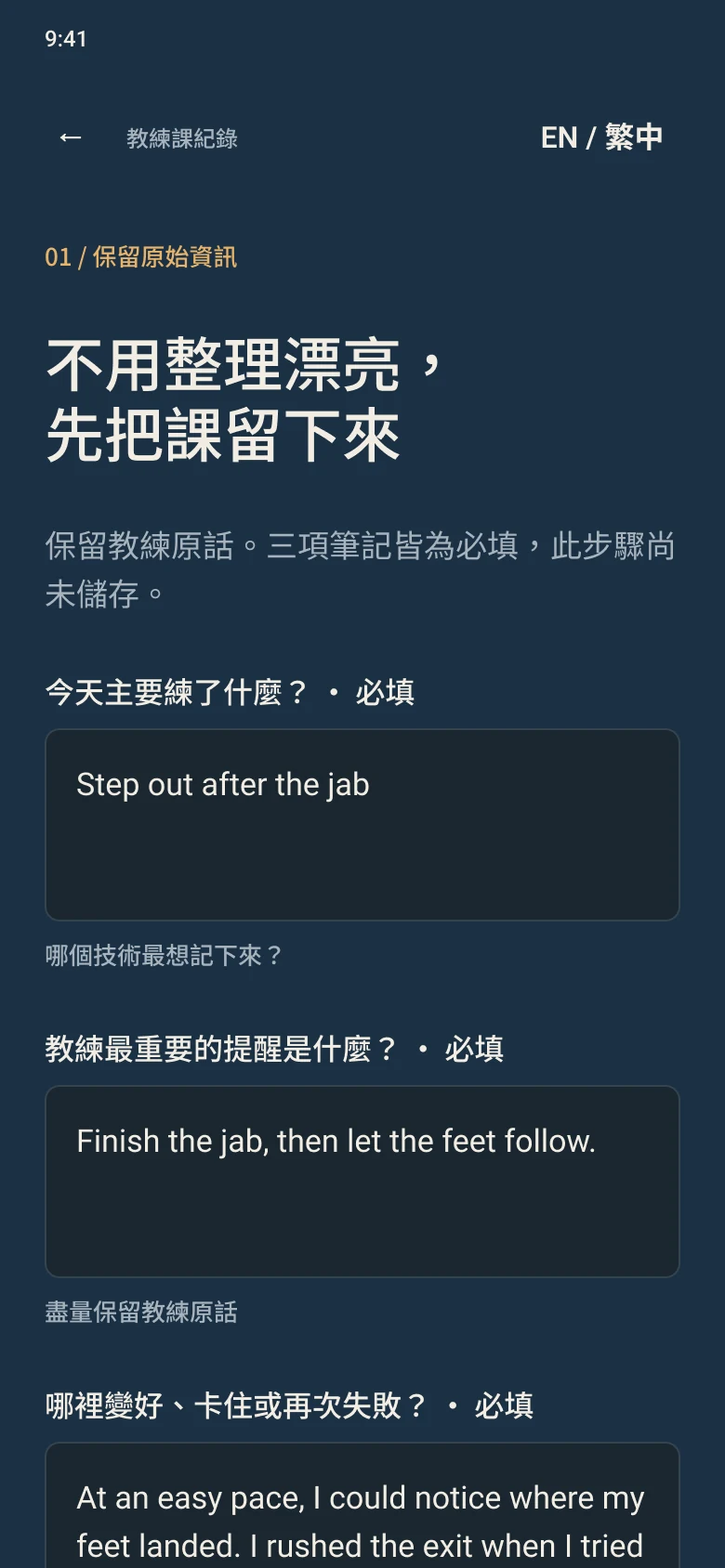
Right after class: what you worked on, the coach’s advice in their own words, and what improved or felt difficult. All three are required.

Interface design: Step 1, writing coaching notes right after class.

NOTHING SAVED YET

STEP 2 · PRACTICE

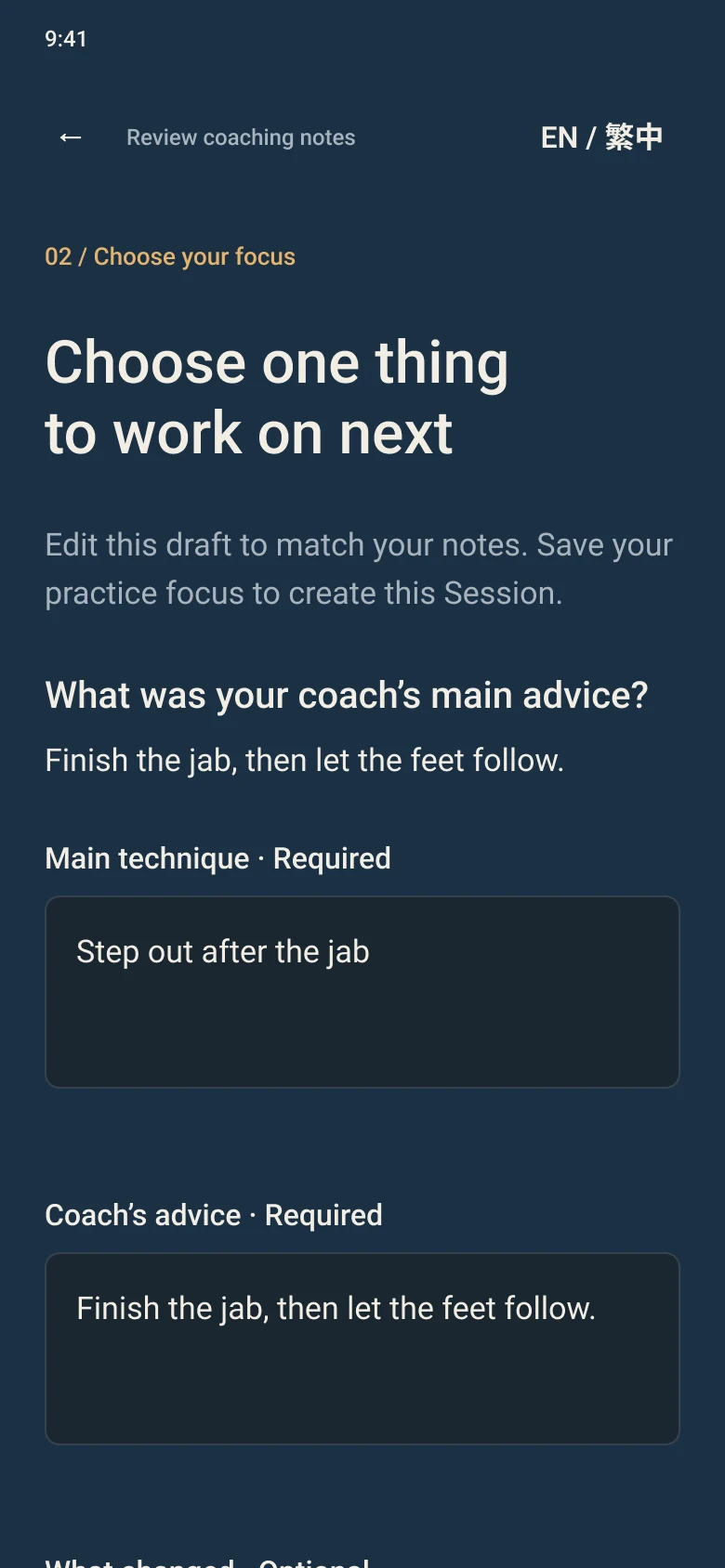
Choose one thing to work on

Edit a draft built from your notes while the coach’s original words stay visible. Pick one practice focus.

Interface design: Step 2, choosing one practice focus while the coach’s original words stay visible.

FOCUS SAVED · SESSION CREATED

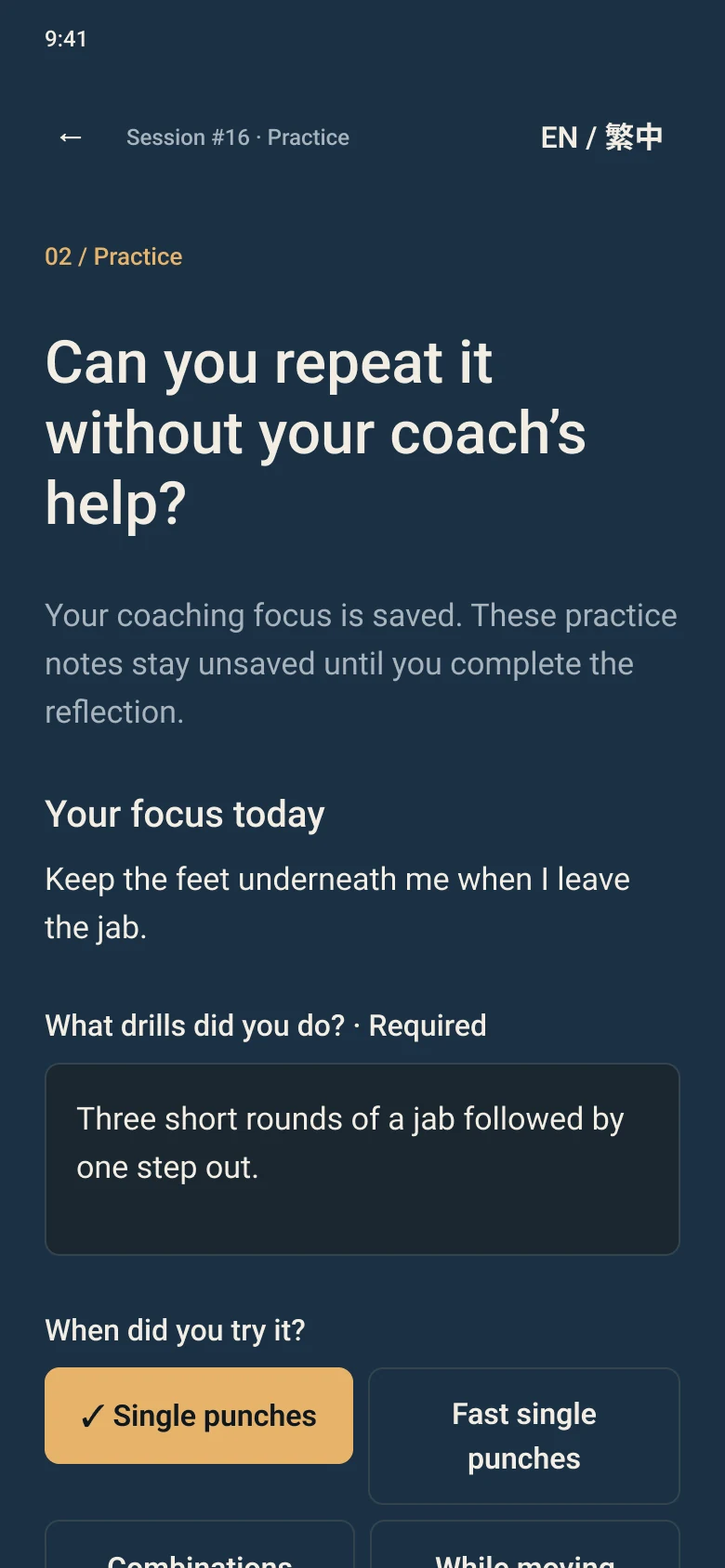
Repeat it without the coach

Drills, context, a 1–10 consistency check, and when it worked or didn’t.

Interface design: Step 2, logging solo practice with a 1–10 consistency check.

HELD UNTIL REFLECTION

STEP 3 · REFLECTION

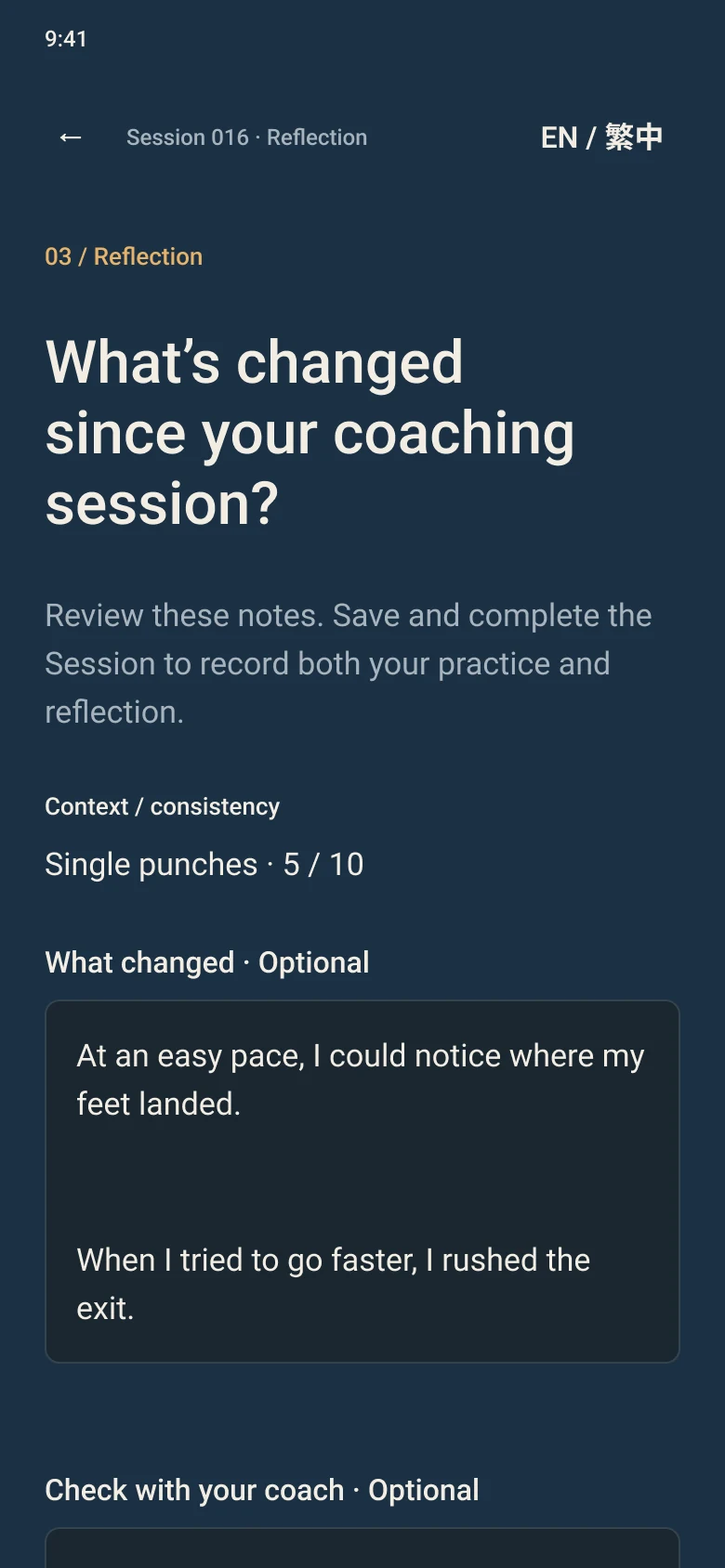
What’s changed since coaching?

What changed, what to check with your coach, and the next focus. Saving completes the session.

Interface design: Step 3, the reflection that completes the session.

SAVED TOGETHER · SESSION COMPLETE

THE RECORD

Every completed session reads the same way.

What worked
When the technique held up.
Still difficult
Where it broke down.
Next time
The focus to carry into the next class.

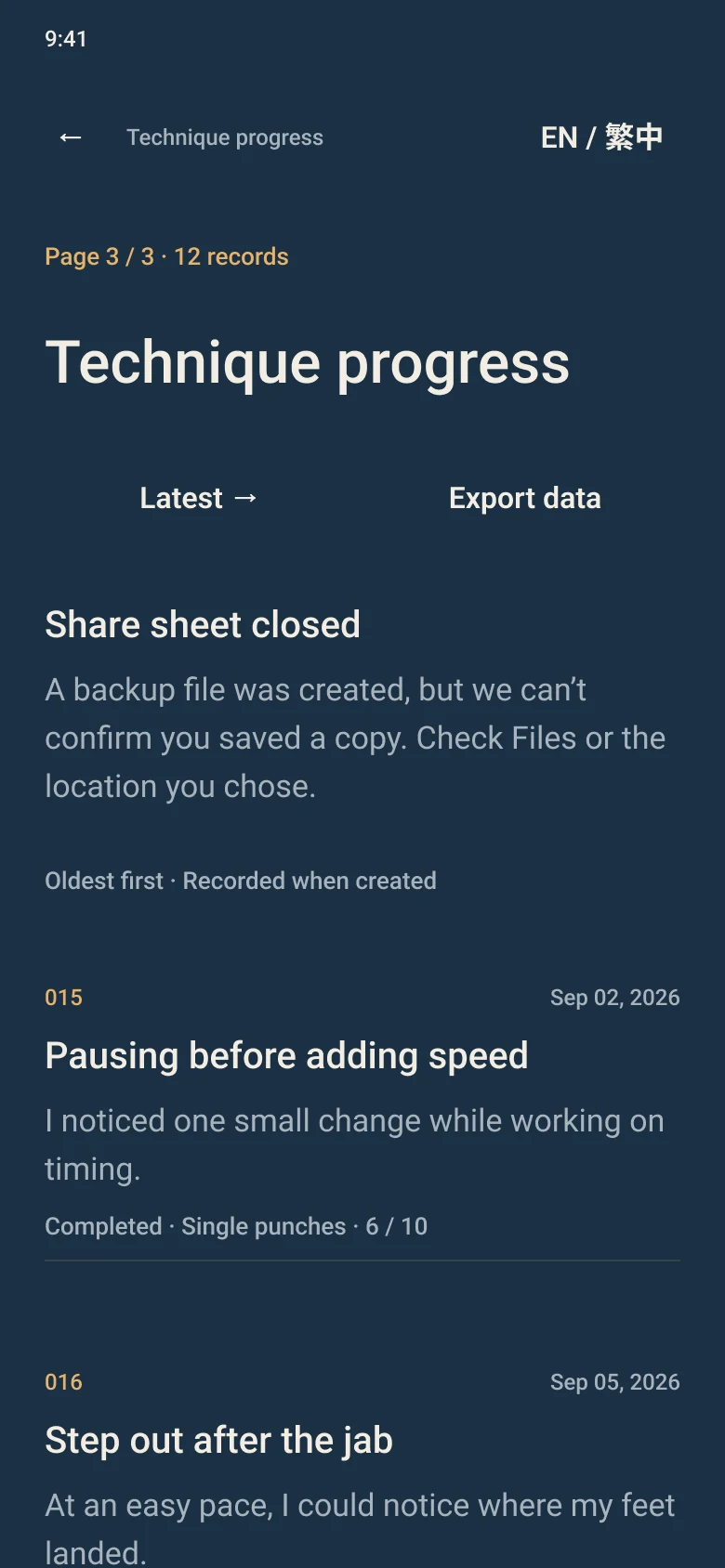
Technique progress lists every session oldest-first, so changes show up over time — and it is where a backup export starts.

Interface design: a completed session record.
Interface design: Technique progress, listing sessions oldest-first.

04 · LIVING WITH IT

Living with the record.

A journal kept for months needs ways to fix, remove, read and take out what’s in it — without surprises.

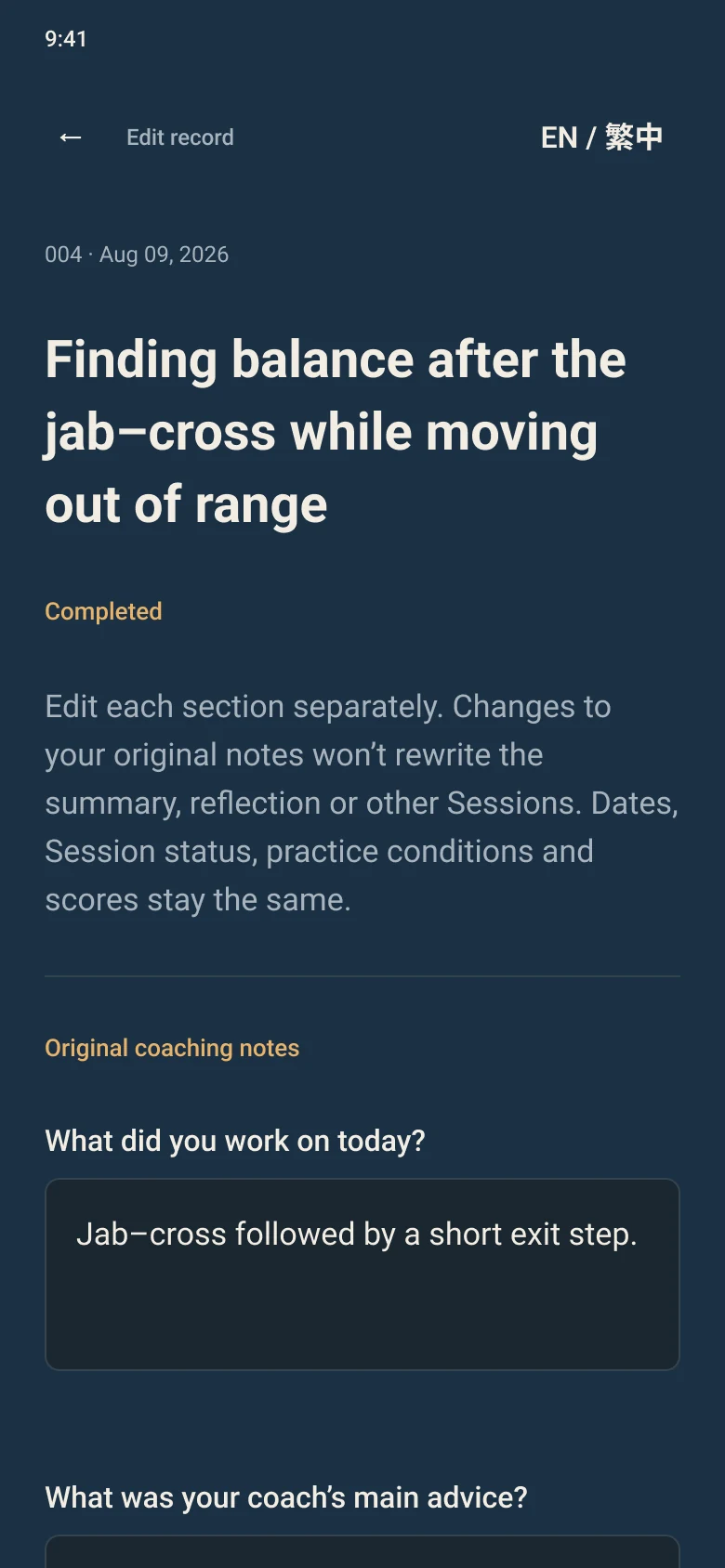
  • EDIT

    Edit one section at a time

    Original notes, coaching summary, practice and reflection are edited separately. Changing one won’t rewrite the others; dates, status, conditions and scores stay fixed.

    Interface design: editing one section of a session record.
  • DELETE

    Delete on purpose

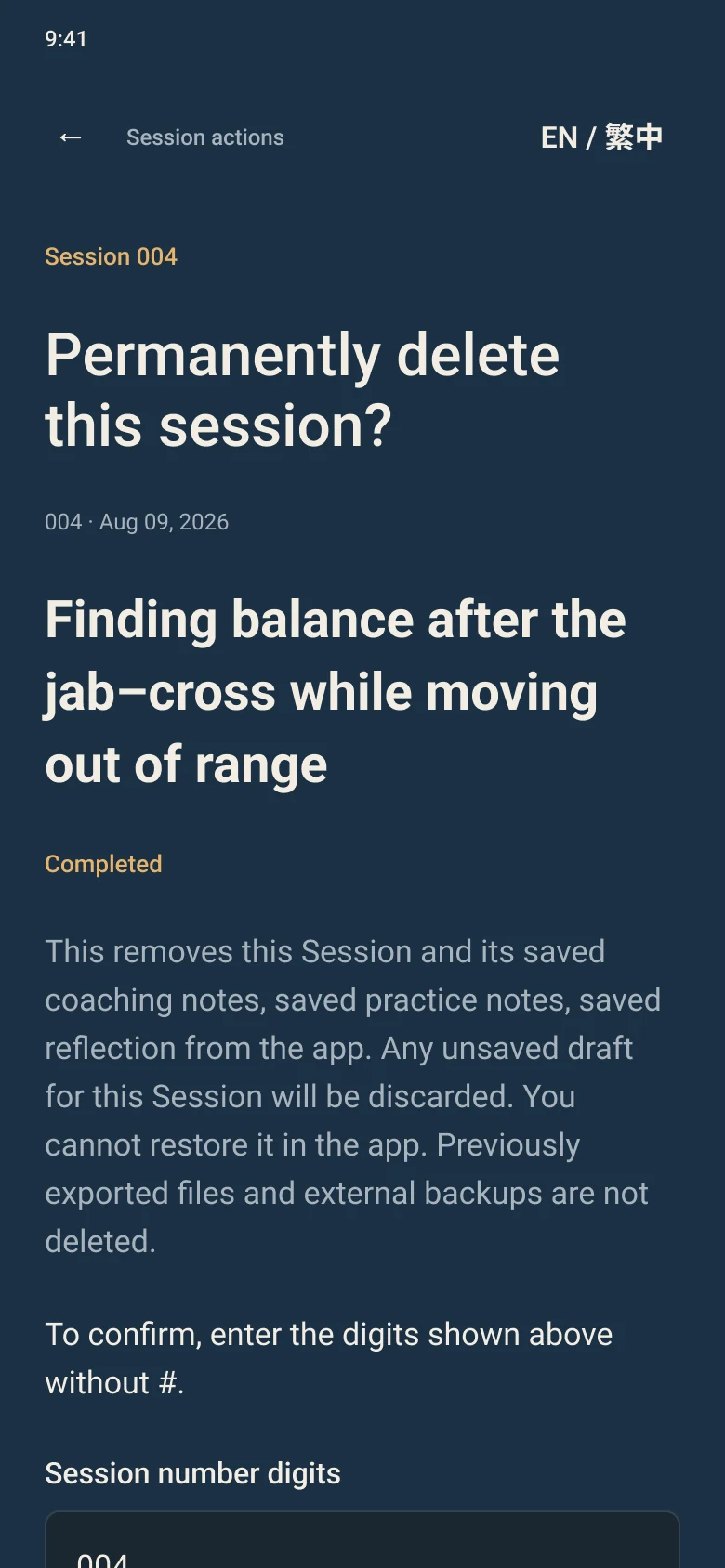
    Permanent deletion asks you to type the session number and says exactly what goes — and that exported files and backups don’t.

    Interface design: the permanent-deletion confirmation.
  • LANGUAGE

    Switch language, keep the words

    The interface switches between English and 繁體中文. Notes stay as written; nothing is machine-translated.

    Interface design: the 繁體中文 interface, with notes kept as written.
  • EXPORT

    Take a copy out

    Export creates a backup file from Technique progress. If the share sheet closes, the app says it can’t confirm a copy was saved.

    Interface design: the notice shown when the app can’t confirm an export was saved.

WHEN THE APP CAN’T BE SURE

It says so, instead of pretending.

If a save can’t be confirmed, the app shows “Save not confirmed,” asks you to retry the same change, and pauses other actions until it’s resolved. The same rule covers edits and deletion.

Interface design: the “Save not confirmed” notice asking to retry the same change.

05 · DECISIONS

Calls that protect the record.

DECISION 01

Lock a session once it’s complete?

NOT CHOSEN

Option A · Lock it

+ The record can’t drift after the fact.

− Typos and wrong words become permanent.

CHOSEN

Option B · Allow edits, one section at a time

+ Notes can be corrected without erasing the session.

− Needs rules for what can’t change: dates, status, scores.

Why: Correcting a note isn’t the same as canceling a session, so editing and deletion became separate actions.

DECISION 02

Translate notes when the interface language changes?

NOT CHOSEN

Option A · Translate them

+ One language on screen.

− Rewrites the coach’s words and can add errors.

CHOSEN

Option B · Keep notes as written

+ The coach’s words stay exactly as recorded.

− Older notes may not match the interface language.

Why: The point of the journal is the coach’s exact words.

DECISION 03

Show success when a save can’t be confirmed?

NOT CHOSEN

Option A · Assume it worked

+ Fewer interruptions.

− Silent data loss looks like success.

CHOSEN

Option B · Say so and pause

+ You know to retry before moving on.

− An extra screen in rare cases.

Why: A journal is only useful if you can trust what’s in it.

All three were my calls as product owner; AI proposed and implemented the options.

06 · BUILT WITH AI

AI writes most of the code. I decide what ships.

The practical problem: AI can move from a suggestion to a “completed” report faster than I can check every technical claim. So the work runs through three gates.

  1. 01

    SCOPE

    Define permitted changes, actions, stop conditions and deliverables. Finishing one task doesn’t authorize the next.

  2. 02

    EVIDENCE

    Separate local measurements, checked attachments, cited reports and unknowns. Repeating a report isn’t new evidence.

  3. 03

    ACCEPTANCE

    I check what the product actually does. Designated reviewers cover technical and security questions within their scope. Missing evidence stays unverified.

WHEN THE SCOPE SLIPPED

An AI response read a request to draft a session-maintenance plan as permission to start building. I restated the drafting scope and settled the open product decision first.

WHEN THE ENGLISH WASN’T GOOD ENOUGH

I rejected the first English copy and asked for revisions, then ran seven manual checks myself: bilingual use, input preservation, saved preferences, reopening, original-language notes, and narrow and enlarged layouts.

The roles and gates are documented workflow controls. They are not technical permission isolation, autonomous multi-agent operation or independent security assurance.

07 · ROLE & LIMITS

What was mine, and what this case can’t claim.

MY ROLE

  • Product owner.
  • Raised the requirements; chose and revised the solutions AI proposed.
  • Set work boundaries and stop conditions for each AI role.
  • Accepted or rejected work by checking product behavior by hand.

LIMITS

  • In development: internal iOS builds, not yet on TestFlight or the App Store.
  • Screens on this page are interface designs, not captures from the app.
  • No claims about adoption or training improvement.
  • Manual check results are my own reports; technical and security reviews were not re-checked for this page.